Category: Uncategorized

  • Life Insurance Explained: Term vs Whole Life and How Much You Need

    Life Insurance Explained: Term vs Whole Life and How Much You Need

    Life insurance is one of the most misunderstood financial products. People either avoid it entirely (dangerous) or buy the wrong type (expensive).

    The confusion starts with a simple question: “Should I buy term or whole life insurance?”

    The answer determines whether you’ll spend $50/month or $300/month for the same death benefit—a difference of $300,000 over a lifetime.

    Most people buying whole life insurance don’t need it. Most people who actually need life insurance aren’t buying enough. And the sales tactics used to sell whole life insurance (often by well-meaning agents) create unnecessary expense.

    Here’s the truth: For 95% of people, term life insurance is the objectively better choice. Period.

    But understanding why—and knowing the rare situations where whole life makes sense—is crucial for making the right decision.

    In this comprehensive guide, you’ll discover the complete comparison between term and whole life insurance, understand the math behind each option, calculate exactly how much coverage you need, learn what determines your premiums, and know exactly which type is best for your situation.

    By the end, you’ll understand life insurance better than 99% of people and make a confident, informed decision.

    Let’s dive in and remove the confusion.


    The Fundamental Question: What Is Life Insurance?

    Before comparing types, let’s understand what life insurance actually does.

    Life Insurance’s Core Purpose

    Life insurance pays a lump-sum benefit to your beneficiaries (people you designate) when you die. That’s it. Simple.

    The purpose: Replace your income if you die, so dependents maintain their standard of living.

    Who needs it:

    • You have children
    • You have a spouse depending on your income
    • You have significant debts (mortgage, student loans)
    • Others financially depend on you

    Who doesn’t need much:

    • Single with no dependents
    • Wealthy with substantial assets
    • Retired with sufficient passive income
    • Children without dependents

    The Insurance Math

    Life insurance solves a basic financial problem:

    Without insurance:

    • You die
    • Your income stops immediately
    • Your family loses $3,000-$10,000/month income
    • They scramble to survive financially

    With insurance:

    • You die
    • Insurance pays $500,000 lump sum
    • Family invests it at 4% returns
    • Family receives $20,000/year income indefinitely
    • Financial security maintained

    Cost comparison:

    • Monthly life insurance premium: $50
    • Annual cost: $600
    • 30-year cost: $18,000
    • Death benefit: $500,000
    • Net value if you die: $482,000 (after subtracting premiums paid)

    The leverage is incredible. You pay $18,000 over your lifetime to protect $500,000 of family income.


    Term Life Insurance: The Simple, Affordable Option

    Term life insurance is straightforward: You pay monthly premiums for a specific “term” (time period). If you die during that term, your beneficiaries get the death benefit. If you survive the term, the coverage expires.

    How Term Life Works

    Simple example:

    You’re age 30 and buy a 20-year term life policy with $500,000 death benefit.

    • Years 1-20: You pay $40/month, have $500,000 coverage
    • Year 20 (age 50): Term expires, coverage ends
    • Scenario A (you die at age 45): Family receives $500,000 death benefit
    • Scenario B (you die at age 55): Family receives $0 (coverage expired)

    This is why the term length matters: You need enough coverage during the years your family depends on your income.

    Term Lengths Available

    Most insurance companies offer:

    • 10-year term: Coverage for 10 years
    • 15-year term: Coverage for 15 years
    • 20-year term: Coverage for 20 years (most popular)
    • 30-year term: Coverage for 30 years
    • Term to age 65: Coverage until age 65 (essentially 30-40 year term depending on current age)

    Costs increase dramatically with term length:

    30-year-old buying $500,000 coverage:

    • 10-year term: $20-25/month
    • 20-year term: $30-45/month
    • 30-year term: $50-75/month

    Longer terms cost more because insurer’s risk extends further.

    Term Life Costs: What Determines Your Premium

    Your life insurance premium depends on:

    1. Age (biggest factor)

    Costs roughly double every 10 years:

    • Age 25: $15/month for $500,000 coverage
    • Age 35: $25-30/month for same coverage
    • Age 45: $50-60/month for same coverage
    • Age 55: $100-150/month for same coverage

    Action: Buy while young (premiums locked for entire term)

    2. Health Status

    Excellent health: Standard rates

    Good health: Standard rates (vast majority qualifies)

    Health issues: Premium increases of 25-200% depending on severity

    • High blood pressure (controlled): +25-50%
    • Diabetes (controlled): +50-100%
    • Heart disease: +100-300%
    • Cancer history: +200-500%
    • Smoking: +100-200%

    Action: Quit smoking (saves hundreds annually)

    3. Smoking Status

    Smokers pay 2-4x more than non-smokers.

    $500,000 20-year term for 35-year-old:

    • Non-smoker: $35/month
    • Smoker: $75-140/month

    Annual difference: $480-$1,260

    Action: If considering life insurance as motivation to quit smoking—do it now (savings alone pay for program)

    4. Coverage Amount

    Higher death benefits cost more (proportionally):

    • $250,000 coverage: $20/month
    • $500,000 coverage: $30/month
    • $1,000,000 coverage: $55/month
    • $2,000,000 coverage: $100/month

    Note: Cost per $1,000 of coverage actually decreases with larger amounts (economy of scale).

    Action: Buy adequate coverage (savings per dollar of coverage is better with larger policies)

    5. Gender (women pay less)

    Women live longer, statistically, so insurance costs 20-40% less:

    35-year-old buying $500,000 20-year term:

    • Men: $40-45/month
    • Women: $25-30/month

    Action: Unfortunately not controllable, but explains rate differences

    6. Medical Exam vs No Medical Exam

    Medical exam required ($1,000+ coverage):

    • Blood test
    • Urine test
    • Health history
    • Blood pressure check
    • Takes 2-4 weeks to underwrite

    No medical exam (smaller amounts):

    • Quick approval (sometimes hours)
    • Higher cost per dollar of coverage (25-50% more expensive)
    • Limited to $100,000-$250,000 typically

    Recommendation: Get medical exam if buying substantial coverage (savings on lower rates outweigh exam hassle)

    Term Life Cost Examples

    Healthy 30-year-old non-smoker:

    • $500,000 20-year term: $30-40/month
    • $1,000,000 20-year term: $50-65/month
    • $1,500,000 20-year term: $70-90/month

    Healthy 40-year-old non-smoker:

    • $500,000 20-year term: $45-60/month
    • $1,000,000 20-year term: $80-110/month
    • $1,500,000 20-year term: $110-150/month

    Healthy 50-year-old non-smoker:

    • $500,000 20-year term: $100-130/month
    • $1,000,000 20-year term: $180-230/month
    • $1,500,000 20-year term: $250-320/month

    Notice the dramatic cost increases after 40. This is why buying young matters.

    Term Life Advantages

    ✅ Extremely affordable: $30-50/month for substantial coverage

    ✅ Simple: Easy to understand—pay premium, get death benefit if you die during term

    ✅ Flexible: Buy as much or little as you need

    ✅ No complexity: No investment components, cash value, loans—just insurance

    ✅ Perfect coverage timing: 20-year term while kids are young; coverage expires when they’re independent

    ✅ Can be converted: Some policies convertible to whole life later (without re-qualifying medically)

    ✅ Guaranteed rates: Premiums locked for entire term (won’t increase)

    ✅ Best value: Most coverage per dollar spent

    ✅ Renewable: Many policies allow renewal at end of term (at higher rates)

    Term Life Disadvantages

    ❌ Coverage expires: After term ends, coverage is gone (you’re too expensive to replace at new age)

    ❌ Doesn’t build cash value: Premium payments don’t accumulate equity

    ❌ Renewing is expensive: Renewing at end of term costs much more (age increased)

    ❌ Less sophisticated: No investment component or policy loans

    ❌ Not for lifetime protection: Can’t use term to cover funeral costs if living to 90


    Whole Life Insurance: The Permanent, Complex Option

    Whole life insurance is fundamentally different from term. Instead of temporary coverage, it covers your entire life and includes an investment component.

    How Whole Life Works

    Basic structure:

    You pay substantially higher premiums than term. The insurance company:

    1. Takes what’s needed for death benefit protection
    2. Invests the remaining premium in a cash value account
    3. Pays you interest on the cash value (typically 4-6% annually)
    4. You can borrow against the cash value
    5. The coverage lasts your entire life (whenever you die, beneficiaries get death benefit)

    Simple example:

    You’re age 35 and buy whole life policy with $500,000 death benefit.

    • Year 1: You pay $250/month ($3,000/year)
      • $40/month covers actual insurance cost
      • $210/month accumulates in cash value account
      • Cash value account: $2,520 (plus interest)
    • Year 10: Cash value account: $35,000+ (depending on returns)
      • You can borrow $35,000 from your policy
      • Death benefit still $500,000
    • Age 80 (still living): Cash value account: $200,000+
      • You can withdraw or borrow funds
      • Death benefit still $500,000 available for beneficiaries
    • Whenever you die: Beneficiaries get $500,000 death benefit (regardless of age)

    Whole Life Costs: What Determines Premium

    Whole life premiums depend on:

    1. Age (significant factor)

    Whole life is much more expensive at younger ages because you have longer to live (more years of premiums to build cash value):

    • Age 25: $150/month
    • Age 35: $220/month
    • Age 45: $350/month
    • Age 55: $550/month

    For $500,000 coverage, 20-year term compares to whole life as:

    • Age 35: 20-year term $40/month vs whole life $220/month (5.5x more)
    • Age 45: 20-year term $60/month vs whole life $350/month (5.8x more)

    2. Coverage Amount

    Like term insurance, larger death benefits cost more monthly.

    3. Health Status

    Same as term—better health = lower rates

    4. Smoking Status

    Smokers pay significantly more (100%+ premium increase)

    5. Type of Whole Life

    Standard whole life: Fixed premium, fixed death benefit, guaranteed cash value

    Universal life: Flexible premium, flexible death benefit, varies with investment performance

    Variable universal life: Your premiums invested in market-linked accounts, higher risk/reward

    Indexed universal life: Premiums invested in stock market index, moderate risk

    Each has different cost structures.

    Whole Life Advantages

    ✅ Lifetime coverage: Protection for entire life (whenever you die)

    ✅ Builds cash value: Can borrow against accumulated funds

    ✅ Fixed premium: Payments never increase (don’t worry about renewing at old age)

    ✅ Forced savings: Some view it as “enforced savings plan”

    ✅ Loan availability: Can borrow against cash value at relatively low rates

    ✅ Estate planning tool: Can help cover estate taxes for wealthy individuals

    ✅ Guaranteed returns: Cash value guaranteed to grow (unlike stocks)

    ✅ Tax benefits: Death benefits tax-free to beneficiaries, cash value grows tax-deferred

    Whole Life Disadvantages

    ❌ Extremely expensive: $200-400+/month vs. $40-60/month for term

    ❌ Complex: Hard to understand mechanics of cash value, investment, and insurance components

    ❌ Poor returns: Cash value typically earns 4-6% when you could earn 8-10% with index funds

    ❌ Expensive early: First 5-10 years, almost entire premium goes to commissions and fees, minimal cash value

    ❌ Complicated loans: Borrowing against policy reduces death benefit unless repaid

    ❌ Surrender charges: Canceling policy early results in losing significant portion of contributions

    ❌ Inflexible: Once premium set, hard to change coverage amount without new medical underwriting

    ❌ Overkill for most situations: Most people don’t need lifetime coverage (children grow up, mortgage gets paid)

    ❌ Poor investment option: Borrowing at 5% to get 4% return doesn’t make financial sense



    Term vs Whole Life: The Direct Comparison

    Cost Comparison Over 30 Years

    Scenario: 35-year-old buying $500,000 coverage

    20-year term life:

    • Monthly premium: $40
    • Annual cost: $480
    • Total over 20 years: $9,600
    • Coverage expires at age 55
    • Total cost for protection: $9,600

    Whole life (same death benefit):

    • Monthly premium: $220
    • Annual cost: $2,640
    • Total over 20 years: $52,800
    • Total over 30 years: $79,200
    • Coverage continues for entire life
    • Cash value after 20 years: $75,000-$90,000

    The math:

    If you die before age 55 (during 20-year term):

    • Term: Family gets $500,000 death benefit (net gain: $490,400)
    • Whole life: Family gets $500,000 death benefit (net gain: $447,200)
    • Advantage: Term (same benefit, less paid in premiums)

    If you live past age 55 (term expires):

    • Term: No coverage (need to buy expensive renewal or do without)
    • Whole life: Still have $500,000 coverage plus $75,000-$90,000 in cash value
    • Advantage: Whole life

    If you live to age 90:

    • Term: Total premiums paid: $9,600 for 20 years of protection
    • Whole life: Total premiums paid: $198,000 over 55 years of protection, plus $150,000-$200,000 in cash value
    • Advantage: Depends on when you die

    Return on Investment Comparison

    If you view life insurance as investment:

    Term life: Pure insurance, no investment component

    Whole life: Blends insurance with forced investment

    Compare to alternatives:

    Pay $40/month for term (20-year), invest difference ($220-$40=$180/month) in index funds:

    • 20-year term cost: $9,600
    • Invested difference at 8% return: $64,000+
    • Total assets: $64,000
    • Insurance coverage: $500,000 death benefit
    • Total protection: Same as whole life, but more flexibility

    Compare to alternatives:

    Pay $220/month for whole life:

    • 20-year whole life cost: $52,800
    • Cash value after 20 years: $75,000-$90,000
    • Insurance coverage: $500,000 death benefit
    • Total protection: Same as term + investment, but invested in insurance company’s portfolio (likely lower returns)

    The verdict: Mathematically, term + index funds investing the difference outperforms whole life for most people.

    Life Stage Comparison: When You’d Actually Need Coverage

    Ages 0-25: Probably don’t need life insurance yet

    • No dependents
    • No mortgage
    • No major debts
    • Future income earning potential

    Ages 25-35 (Starting families):

    • ✅ PERFECT for term life insurance
    • Young (cheap rates)
    • Have kids (need protection)
    • Career building (long earning years ahead)
    • 30-year term makes sense (coverage to age 65)

    Ages 35-50 (Family years):

    • ✅ STILL need term life insurance
    • Kids still dependent
    • Mortgage substantial
    • Working years remaining

    Ages 50-65 (Pre-retirement):

    • ✅ Term life still relevant (kids still dependent, mortgage years remaining)
    • Consider reducing coverage as kids become independent
    • 20-year term covers to retirement

    Ages 65+ (Retirement):

    • ❓ Life insurance becomes optional
    • Kids independent
    • Mortgage paid off
    • Nest egg accumulated
    • Only need coverage if:
      • Still have young dependents (rare)
      • Estate taxes exceed $12+ million (not most people)
      • Want to leave inheritance (choose term, not whole)

    Calculating Your Life Insurance Needs

    This is the most important calculation you’ll do. Get it right.

    Method 1: Income Replacement

    How it works: Calculate years of income family needs replaced.

    Calculation:

    • Annual expenses needed: $50,000
    • Years until retirement: 25 years
    • Total needed: $1,250,000
    • Add buffer (20%): $1,500,000

    Use this if: You want family to maintain current lifestyle indefinitely.

    Method 2: Debt Plus Expenses

    How it works: Cover all debts plus years of living expenses.

    Calculation:

    • Mortgage balance: $300,000
    • Other debts (car, student loans): $50,000
    • Years of expenses (25 × $50,000): $1,250,000
    • Total needed: $1,600,000
    • Round to: $1,500,000-$1,750,000

    Use this if: You want family to have home paid off and years of living expenses covered.

    Method 3: Income Multiple

    How it works: Simple rule of thumb (10-12x annual income).

    Calculation:

    • Annual income: $75,000
    • Multiple: 10x
    • Coverage needed: $750,000

    Use this if: You want simple, quick calculation.

    Note: This method is less precise but good for quick estimates.

    Method 4: Detailed Analysis

    How it works: Calculate exact expenses and timeline.

    Calculation:

    1. Annual household expenses: $60,000
    2. Years of expenses needed:
      • Child 1 (currently 8): $52,000 (10 years)
      • Child 2 (currently 6): $60,000 (12 years)
      • Spouse (until retirement): $60,000 (30 years)
      • Total: $52,000 + $60,000 + $60,000 = $172,000 years
    3. Adjust for inflation (3%): $172,000 × 1.3 = $223,600
    4. Account for investment returns on benefit (4% earnings on remaining balance): Reduce by 15% = $190,000
    5. Add funeral/misc: $15,000
    6. Coverage needed: ~$200,000-$250,000

    Use this if: You want precise, detailed calculation.

    Recommended Approach

    Use Method 2 for most people:

    Calculation:

    1. Calculate total debts (mortgage, car loans, student loans, credit cards)
    2. Add 20 years × annual expenses
    3. Add $50,000 for final expenses and buffer
    4. This is your coverage target

    Example:

    • Mortgage: $250,000
    • Car loan: $15,000
    • Student loans: $30,000
    • 20 years expenses at $50,000/year: $1,000,000
    • Final expenses: $50,000
    • Total: $1,345,000 → Round to $1,500,000

    Is more coverage better?

    Generally yes, as long as cost is reasonable. Extra $200,000 coverage often costs only $5-10/month extra. The margin of safety is worth minimal cost.

    Is less coverage acceptable?

    Only if you’re certain about timeline. If unsure, buy more. Underinsuring is bigger risk than slight overinsuring.


    Who Should Buy Term Life Insurance

    Term life is right for you if:

    ✅ You have dependents (children, spouse)
    ✅ You have a mortgage or other debts
    ✅ You’re building your career and earning potential
    ✅ You want maximum protection for minimal cost
    ✅ You’re under age 50
    ✅ You want coverage until retirement
    ✅ You’d rather invest money than buy whole life
    ✅ You want simple, straightforward insurance
    ✅ Your dependents will eventually become independent

    Ideal term life candidate:

    • Age: 30-50
    • Family status: Married with children
    • Financial situation: Mortgage, student loans, growing assets
    • Goal: Protect family if something happens
    • Philosophy: Simple, practical protection

    Action: Buy 20-30 year term NOW while young and healthy.


    Who Should Buy Whole Life Insurance

    Whole life is appropriate for:

    ✅ Net worth over $2 million (considering estate taxes)
    ✅ Wealthy individual wanting lifetime coverage
    ✅ Complex estate planning situation
    ✅ Business owner needing corporate-owned life insurance
    ✅ Person who absolutely will not self-discipline to invest difference
    ✅ Want coverage guaranteed to age 120+
    ✅ Have maxed out other retirement saving options

    Ideal whole life candidate:

    • Age: 45-60 (already have substantial wealth)
    • Net worth: $3 million+
    • Financial situation: Mortgage paid, kids independent
    • Goal: Estate planning and lifetime coverage
    • Philosophy: Willing to pay premium for guaranteed lifetime coverage

    Reality check: If this isn’t you, whole life probably isn’t appropriate.


    Getting Life Insurance: The Process

    Step 1: Determine Coverage Amount

    Use one of the calculation methods above to determine how much coverage you need.

    Typical amounts:

    • Young family ($50k income): $500,000-$750,000
    • Mid-career professional ($75k income): $750,000-$1,200,000
    • High earner ($100k+ income): $1,000,000-$2,000,000

    Step 2: Choose Term Length

    General guidance:

    • Age 25-35: 30-year term (covers to age 55-65)
    • Age 35-45: 20-year term (covers to age 55-65)
    • Age 45-55: 10-20 year term (covers to age 55-75)

    Think about: When will dependents become independent? That’s your minimum term length.

    Step 3: Get Quotes from Multiple Companies

    Never buy from first company that quotes you. Get 5-7 quotes:

    Online quote tools:

    • PolicyGenius
    • Term4Sale
    • InsWeb
    • Quotes.com
    • Direct company websites (Heres Life, Term Life, etc.)

    Comparison notes:

    • Use identical coverage amounts
    • Use identical term lengths
    • Compare apples-to-apples (same death benefit)
    • Note all companies quoting

    Typical quote range:

    30-year-old, $500,000 20-year term:

    • Cheapest: $30-35/month
    • Mid-range: $35-45/month
    • Expensive: $45-60/month

    Price variance is 50%+ between companies, so shopping matters.

    Step 4: Apply

    Choose cheapest quote and apply. Process:

    1. Online application: 15 minutes
    2. Health questions: Standard medical history
    3. Medical records: Company may request from your doctor (optional, speeds underwriting)
    4. Medical exam (if required): Blood/urine test, takes 30 minutes, done at home
    5. Underwriting: 2-4 weeks for approval
    6. Issued: You’re approved, coverage starts upon first premium payment

    Step 5: Set Up Payment

    • Monthly automatic payment from bank account (easiest)
    • Annual payment (saves 5-10% vs monthly)
    • Quarterly payment option

    Recommendation: Set up automatic monthly payment so you never miss a premium.

    Step 6: Name Your Beneficiaries

    Beneficiary: Person who receives death benefit when you die

    Primary beneficiary: First person to receive benefit (spouse, adult child, etc.)

    Contingent beneficiary: Receives benefit if primary beneficiary predeceases you

    Example:

    • Primary: Your spouse
    • Contingent: Your adult children (equally divided if both primary and spouse deceased)

    Important: Update beneficiaries if life changes (marriage, divorce, new children, etc.)

    Step 7: Annual Review

    Every year during anniversary month:

    • ✅ Verify beneficiaries still correct
    • ✅ Confirm coverage amount still adequate
    • ✅ Check if any life changes affect coverage needs
    • ✅ Consider increasing if income increased significantly

    Common Life Insurance Mistakes to Avoid

    Mistake 1: Buying Whole Life When You Need Term

    Error: Agent convinces you whole life is “better” long-term investment

    Reality:

    • Whole life costs 5-6x more than term
    • Returns are lower than index funds
    • Most people don’t need lifetime coverage
    • Cost savings with term far exceed whole life “benefits”

    Solution: Buy term unless you’re wealthy and have estate planning reasons for whole life

    Mistake 2: Underestimating Coverage Needs

    Error: Buying $250,000 coverage when you need $1,000,000

    Result: Family has insufficient funds to maintain lifestyle; forced to sell home or reduce expenses

    Solution: Calculate actual needs using Method 2 (debt + 20 years expenses); buy adequate coverage

    Mistake 3: Waiting to Buy Until Older

    Error: Age 40 thinking “I’ll buy at 50 since I’m healthier now”

    Reality:

    • Insurance is 2-3x more expensive at 50 than at 40
    • Health changes happen (diabetes, heart issues develop)
    • The longer you wait, the more expensive it becomes

    Solution: Buy now while young and healthy; rates are locked for entire term

    Mistake 4: Not Updating Beneficiaries

    Error: Life insurance policy with ex-spouse listed as beneficiary

    Result: Ex-spouse receives death benefit instead of current family

    Solution: Update beneficiaries immediately upon life changes (marriage, divorce, new children)

    Mistake 5: Buying No Life Insurance

    Error: Thinking “insurance isn’t necessary” or “I’m healthy so won’t need it”

    Reality:

    • Death doesn’t discriminate by health
    • Family left without income faces financial devastation
    • Minimal cost protects against catastrophic outcome

    Solution: If anyone depends on your income, buy life insurance (yes, you might not think so, but statistically people with dependents face scenarios where life insurance would be critical)

    Mistake 6: Letting Policy Lapse

    Error: Missing premium payment, coverage lapses

    Result: Death during lapse period = no benefit

    Solution: Set up automatic payment from bank account; impossible to miss payment

    Mistake 7: Comparing Different Coverage Amounts

    Error: Comparing quote of $500,000 coverage to quote for $750,000 coverage

    Result: Higher priced quote seems worse, but might be cheaper per dollar of coverage

    Solution: Always compare identical coverage amounts from different companies

    Mistake 8: Trusting Agent’s Recommendation Blindly

    Error: Agent recommends whole life; you buy without shopping

    Reality: Agents earn 50-90% commission on whole life vs 40-50% on term

    Solution: Get independent quotes from multiple companies; make decision yourself

    Mistake 9: Buying Individual Policies When Group is Available

    Error: Not enrolling in employer group life insurance

    Reality: Employer coverage usually heavily subsidized (you pay $10-20/month, employer pays bulk)

    Solution: Enroll in any employer group coverage available; supplement with individual term if needed

    Mistake 10: Not Re-evaluating Needs Over Time

    Error: Buy $500,000 coverage at age 30; never adjust as income increases

    Result: Coverage becomes inadequate as financial obligations increase

    Solution: Review and adjust coverage every 5 years or after major life changes



    Frequently Asked Questions About Life Insurance

    Should I buy life insurance if I’m young and single?

    Generally no, unless you have significant debts (student loans) or dependents (rare at young age). Once you have a spouse depending on your income or children to support, buy term life immediately.

    Can my employer’s group life insurance replace individual term life?

    Employer coverage is usually too little ($50,000-$250,000 typically), though better than nothing. If you have significant dependents, buy individual term insurance supplementing employer coverage to reach appropriate total amount.

    What happens when my 20-year term expires?

    Coverage ends. You have three options:

    1. Buy a new policy (expensive if older or developed health issues)
    2. Renew existing policy with same company (much more expensive)
    3. Go without coverage (if you have built substantial assets)

    This is why buying young matters—you lock in cheap rates while healthy.

    Can I convert term life to whole life later?

    Many policies include conversion option (check your policy). This lets you convert to whole life without new medical exam—though whole life is still expensive, at least you don’t need health exam.

    Reality: Rarely makes financial sense to convert to whole life, but option exists.

    Can I borrow against term life insurance?

    No. Term insurance has no cash value, so nothing to borrow against. This is advantage of term (pure insurance) vs whole life (blended insurance + investment).

    Should I buy return-of-premium term insurance?

    Return-of-premium (ROP) term returns your premiums at end of term if you survive.

    Example:

    • Regular 30-year term: $50/month = $18,000 total cost
    • ROP 30-year term: $95/month = $34,200 total cost

    Costs nearly 2x as much for benefit that only matters if you survive the entire term.

    Better approach: Buy regular term, invest the premium difference in index funds. You’ll accumulate more than ROP refund.

    When ROP makes sense: You’re risk-averse and want guaranteed recovery of premiums. Otherwise, regular term is better value.

    Can I get life insurance with pre-existing health conditions?

    Yes, but rates are higher. Examples:

    • Controlled hypertension: +25-50% premium
    • Diabetes (controlled): +50-100% premium
    • Heart disease: +100-300% premium
    • Cancer history: +200-500% premium

    You’ll still qualify; just pay more. Still worth buying for family protection.

    Should I take the medical exam or choose no-exam coverage?

    With exam:

    • More thorough underwriting
    • Lower premiums
    • Coverage takes 2-4 weeks
    • Required for larger amounts

    Without exam:

    • Faster approval (sometimes same day)
    • Higher premiums (25-50% more expensive)
    • Limited to $100,000-$250,000
    • Better for small coverage amounts

    Recommendation: Get medical exam for coverage over $300,000 (savings on lower rates worth the exam hassle).

    Can I get life insurance without job/income?

    Yes. Parents, spouses, or other caregivers without income can get coverage if someone else has insurable interest (someone dependent on you).

    Examples:

    • Stay-at-home parent
    • Unemployed spouse
    • Retired person
    • Caregiver for disabled family member

    Life insurance makes sense for anyone whose death would create financial hardship for others.

    What if I’m rated “uninsurable” by one company?

    Try other companies. Underwriting standards vary significantly between insurers. One company’s decline doesn’t mean all companies will decline.

    What to do:

    • Get declined? Try 3-4 other companies
    • Work with broker who represents multiple insurers
    • Be honest about health history
    • Expect higher premiums but don’t give up

    Should I buy life insurance at age 70+?

    Depends. At 70+:

    • Term insurance becomes very expensive (or unavailable)
    • Whole life still available but very expensive
    • Only makes sense if you have young dependents (rare)
    • Consider instead:
      • One-time large gift from investments to dependent
      • Reducing estate taxes with whole life (for wealthy)
      • Forgoing insurance if dependents self-sufficient

    Most 70+ individuals skip new insurance and rely on accumulated assets.


    Life Insurance and Your Complete Financial Picture

    Life insurance doesn’t exist in isolation. It’s one piece of comprehensive financial protection.

    How Life Insurance Fits In

    With emergency fund: Insurance covers catastrophic loss (death)

    • Emergency fund covers small problems (car repair, medical copay)
    • Together: Complete financial safety net

    With disability insurance: Both protect income

    • Life insurance: Protects dependents if you die
    • Disability insurance: Protects you if can’t work
    • Together: Complete income protection

    With retirement savings: Build long-term wealth

    • Life insurance: Protects family while building wealth
    • Retirement accounts: Grow the wealth
    • Together: Financial security across all scenarios

    With will/beneficiary designations: Control asset distribution

    • Life insurance: Death benefit goes to beneficiaries
    • Will: Everything else distributed per your wishes
    • Together: Complete estate plan

    With budgeting: Manage costs effectively

    • Life insurance: One of core financial protections
    • Budgeting: Ensures you can afford premiums
    • Together: Integrated financial plan

    Learn more about complete insurance protection for full picture.


    Take Action: Your Life Insurance Plan

    30-Day Life Insurance Action Plan

    Week 1: Assess Your Need

    •  Determine if anyone depends on your income
    •  Calculate total coverage needed (use Method 2)
    •  Decide between term and whole life (99% choose term)
    •  Choose term length (20-30 years most common)
    •  Document these decisions

    Week 2: Get Quotes

    •  Visit 5-7 quote websites
    •  Enter identical coverage amounts
    •  Enter identical term lengths
    •  Compare prices (spread sheets helps)
    •  Note top 3 cheapest companies

    Week 3: Apply

    •  Choose cheapest qualified company
    •  Complete online application (15 minutes)
    •  Schedule medical exam if required
    •  Provide requested health information
    •  Follow up on application status

    Week 4: Finalize

    •  Receive and review policy
    •  Confirm coverage amount and term length
    •  Update beneficiary designations
    •  Set up automatic monthly payment
    •  Schedule annual review reminder

    Post-implementation:

    •  Review annually (policy anniversary)
    •  Update if life changes (marriage, children, income)
    •  Increase coverage if income increases significantly
    •  Continue building financial security with other protections

    Conclusion: Protect Your Family’s Future

    Life insurance is unsexy. It won’t make you rich. It won’t help you accumulate wealth. But it will protect your family from the most catastrophic financial scenario imaginable: your death.

    The math is irrefutable:

    • $40/month for term insurance
    • $480/year
    • $9,600 over 20 years
    • Protects $500,000 of family income

    That’s one of the best financial bargains available.

    The choice is clear:

    For 95% of people, term life insurance is the objectively correct choice. It provides:

    • ✅ Maximum coverage
    • ✅ Minimum cost
    • ✅ Simple structure
    • ✅ Flexibility
    • ✅ Perfect timing with life stage

    Whole life is rarely appropriate except for wealthy individuals with estate planning needs.

    The biggest mistake: Waiting. Every year you delay:

    • Rates increase
    • Health may change
    • Dependents remain unprotected

    Buy now while young and healthy. Lock in cheap rates for 20-30 years. Know your family is protected.

    The single most important financial decision for people with dependents is buying adequate term life insurance. Everything else—investing, budgeting, saving—assumes you’re alive to execute the plan.

    Make this decision today. Your family’s financial security depends on it.

    Ready to complete your financial protection? Explore these related guides:

  • Best Budgeting Apps: Top Tools to Manage Your Money

    Best Budgeting Apps: Top Tools to Manage Your Money

    Are you tired of wondering where your money goes each month? You’re not alone. According to a 2024 survey, 78% of Americans live paycheck to paycheck, and the biggest culprit isn’t necessarily low income—it’s lack of money tracking.

    The good news? Technology has made budgeting easier than ever. Gone are the days of complicated spreadsheets and manual envelope systems. Today’s budgeting apps automatically track every dollar, categorize your spending, and even predict future expenses—all from your smartphone.

    But with hundreds of budgeting apps available, how do you choose the right one?

    Whether you’re a budgeting beginner looking for something simple, a financial enthusiast who wants detailed analytics, or someone trying to break free from debt, there’s an app designed specifically for your needs.

    In this comprehensive guide, we’ll review the 12 best budgeting apps for 2025, comparing their features, pricing, pros and cons, and ideal users. We’ll also help you understand which budgeting method each app uses, so you can find the perfect match for your financial style.

    By the end of this article, you’ll know exactly which app will help you take control of your money and finally stick to your budget.

    Let’s dive in and find your perfect financial companion.


    Why You Need a Budgeting App in 2025

    Before we explore specific apps, let’s understand why digital budgeting tools have become essential.

    The Problem with Traditional Budgeting

    Traditional budgeting methods—spreadsheets, notebooks, or mental math—have several critical flaws:

    1. Time-Consuming: Manual entry of every transaction takes hours monthly
    2. Delayed Information: By the time you update your spreadsheet, you’ve already overspent
    3. No Real-Time Insights: Can’t see your spending patterns until month-end
    4. Easy to Abandon: Requires constant discipline with no accountability
    5. Limited Visibility: Hard to track multiple accounts, credit cards, and cash simultaneously

    Studies show that 80% of people who start manual budgets quit within the first month.

    How Budgeting Apps Solve These Problems

    Modern budgeting apps offer:

    ✅ Automatic Transaction Syncing: Connects to your bank accounts and credit cards
    ✅ Real-Time Updates: See your spending instantly after each purchase
    ✅ Intelligent Categorization: AI automatically sorts transactions (groceries, dining, bills)
    ✅ Visual Analytics: Charts and graphs make spending patterns obvious
    ✅ Alerts and Notifications: Warns you before you overspend in any category
    ✅ Goal Tracking: Monitor progress toward savings targets
    ✅ Multi-Device Access: Check your budget from phone, tablet, or computer

    The Result: People who use budgeting apps save an average of $600 more annually than those who don’t, according to a 2023 study by the Financial Health Network.

    Understanding Different Budgeting Methods

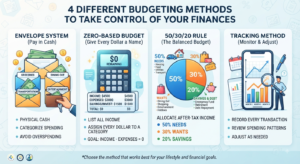
    Different apps use different budgeting philosophies. Understanding these helps you choose the right one:

    Zero-Based Budgeting: Every dollar gets a specific job. Income minus all assigned expenses equals zero. (Used by: YNAB, EveryDollar)

    50/30/20 Method: 50% needs, 30% wants, 20% savings/debt. Simple percentage allocation. (Used by: Mint, PocketGuard)

    Envelope System: Digital version of cash envelopes—once category is empty, no more spending. (Used by: Goodbudget, Mvelopes)

    Tracking-Only: Simply monitors where money goes without strict categories. (Used by: Personal Capital, Simplifi)

    Now let’s explore the best apps in each category.


    The 12 Best Budgeting Apps for 2025

    1. YNAB (You Need A Budget) – Best Overall for Serious Budgeters

    Pricing: $14.99/month or $109/year (34 days free trial)

    Budgeting Method: Zero-based budgeting

    Best For: People serious about transforming their finances and willing to invest time learning the system

    Key Features:

    • Four Rule Philosophy: Give every dollar a job, embrace your true expenses, roll with the punches, age your money
    • Goal Tracking: Set targets for debt payoff, emergency fund, vacations, etc.
    • Real-Time Sync: Updates across all devices instantly
    • Detailed Reports: Age of money, spending by category, income vs. expense trends
    • Educational Resources: Free workshops, tutorials, and budgeting courses
    • Bank Account Sync: Automatically imports transactions from thousands of banks
    • Debt Payoff Planner: Track multiple debts and see payoff timelines

    Pros:
    ✅ Most comprehensive budgeting methodology
    ✅ Excellent educational content and community support
    ✅ Users report average savings of $600 in first two months
    ✅ Strong privacy protections and bank-level security
    ✅ Works for variable income earners
    ✅ Available on iOS, Android, and web

    Cons:
    ❌ Steeper learning curve than other apps
    ❌ Most expensive option on our list
    ❌ Requires active daily/weekly engagement
    ❌ Can feel overwhelming for budgeting beginners

    Real User Results: YNAB users report paying off an average of $6,000 in debt in the first year and saving their first $500 emergency fund within 60 days.

    Best Alternative If Price Is Too High: EveryDollar offers similar zero-based budgeting at lower cost.

    Our Verdict: If you’re serious about budgeting and willing to invest both money and time, YNAB delivers unmatched results. The monthly cost pays for itself through reduced spending and better financial decisions.


    2. Mint – Best Free All-Around Budgeting App

    Pricing: Completely free (ad-supported)

    Budgeting Method: Income minus expenses tracking with customizable categories

    Best For: Beginners who want comprehensive features without monthly costs

    Key Features:

    • Automatic Categorization: AI learns your spending patterns and categorizes transactions
    • Bill Tracking: Reminds you of upcoming bills and subscriptions
    • Credit Score Monitoring: Free weekly FICO score updates
    • Investment Tracking: Monitor all accounts in one dashboard
    • Budget Alerts: Notifications when approaching category limits
    • Custom Categories: Create unlimited spending categories
    • Trend Analysis: Visualize spending patterns over time
    • Financial Tips: Personalized recommendations to save money

    Pros:
    ✅ Completely free with robust features
    ✅ Extremely user-friendly interface
    ✅ Connects to over 16,000 financial institutions
    ✅ Excellent mobile app (iOS and Android)
    ✅ Credit score monitoring included
    ✅ Strong customer support
    ✅ Low learning curve—start budgeting in minutes

    Cons:
    ❌ Contains ads and product recommendations
    ❌ Less hands-on than zero-based budgeting apps
    ❌ Occasional syncing issues with some banks
    ❌ Categories can be too broad for detailed budgeters
    ❌ Owned by Intuit (sells anonymized data for marketing)

    Privacy Note: Mint uses bank-level 256-bit encryption, but monetizes through targeted financial product recommendations based on your data.

    Best For: People who want a “set it and forget it” budgeting solution with minimal daily interaction. Perfect for tracking overall spending without intensive category management.

    Our Verdict: The best free option available. While it lacks the intensive methodology of YNAB, Mint provides excellent tracking and insights without costing a penny. Perfect entry point for budgeting beginners.


    3. EveryDollar – Best for Dave Ramsey Fans

    Pricing: Free version available; Premium $17.99/month or $79.99/year

    Budgeting Method: Zero-based budgeting (Dave Ramsey’s methodology)

    Best For: Followers of Dave Ramsey’s Baby Steps and zero-based budgeting philosophy

    Key Features:

    • Baby Steps Integration: Built around Dave Ramsey’s 7 Baby Steps framework
    • Zero-Based Budgeting: Assign every dollar before the month begins
    • Drag-and-Drop Interface: Extremely intuitive budget creation
    • Debt Snowball Tracker: Built-in debt payoff calculator
    • Premium Bank Connectivity: Automatic transaction imports (Premium only)
    • Custom Budget Lines: Unlimited categories and subcategories
    • Spending Tracker: Quick expense entry via mobile app
    • Financial Peace University Integration: Syncs with FPU course progress

    Pros:
    ✅ Free version is genuinely useful (unlike many freemium apps)
    ✅ Beautifully designed, simple interface
    ✅ Perfect for Dave Ramsey program followers
    ✅ Strong debt payoff features
    ✅ Annual premium cheaper than YNAB
    ✅ Excellent mobile app experience
    ✅ Quick budget setup (under 15 minutes)

    Cons:
    ❌ Free version requires manual transaction entry
    ❌ Less detailed reporting than YNAB or Mint
    ❌ Bank syncing only available in premium version
    ❌ Limited investment tracking features
    ❌ Fewer educational resources than YNAB

    Free vs. Premium: The free version is excellent for manual budgeters willing to input transactions. Premium adds automatic bank syncing and custom reports—worth it if you manage multiple accounts.

    Our Verdict: Perfect middle ground between YNAB and Mint. Offers zero-based budgeting philosophy at a more affordable price point. The free version is surprisingly robust for those willing to manually track expenses.


    4. PocketGuard – Best for Simplicity

    Pricing: Free version; PocketGuard Plus $12.99/month, $74.99/year, or $99.99 lifetime

    Budgeting Method: “In My Pocket” calculation (income minus bills, goals, and necessities)

    Best For: People who want dead-simple budgeting without category management

    Key Features:

    • In My Pocket Feature: Shows exactly how much you can safely spend after all obligations
    • Bill Negotiation Service: Built-in bill negotiation for cable, internet, phone bills
    • Spending Insights: Simple categorization of where money goes
    • Debt Payoff: Track multiple debts with payoff projections
    • Budget Optimization: AI suggests ways to reduce recurring expenses
    • Auto-Categorization: Learns your spending patterns
    • Account Syncing: Links to bank accounts, credit cards, loans, investments

    Pros:
    ✅ Simplest interface of any budgeting app
    ✅ “In My Pocket” eliminates budget category confusion
    ✅ Lifetime subscription option (best long-term value)
    ✅ Excellent for people overwhelmed by traditional budgets
    ✅ Built-in bill negotiation saves hundreds annually
    ✅ Great for variable income earners
    ✅ Minimal time investment required

    Cons:
    ❌ Too simple for detail-oriented budgeters
    ❌ Limited customization options
    ❌ Fewer features than competitors at similar price
    ❌ Some users report syncing delays
    ❌ Limited investment tracking

    Who Should Use This: If you’re new to budgeting or have failed with more complex systems, PocketGuard removes the intimidation factor. The “In My Pocket” number answers the only question most people really care about: “Can I afford this purchase right now?”

    Our Verdict: Perfect for budgeting-averse individuals who need simple guidance. Not robust enough for financial enthusiasts, but ideal for those who found other apps too complicated.


    5. Personal Capital – Best for High Net Worth & Investment Tracking

    Pricing: Free (with optional paid financial advisor services)

    Budgeting Method: Tracking-focused with investment portfolio management

    Best For: People with significant investments who want combined budgeting and wealth management

    Key Features:

    • Investment Dashboard: Track all investment accounts, 401(k)s, IRAs in one place
    • Retirement Planner: Calculate if you’re on track for retirement goals
    • Net Worth Tracking: Automatic updates of total assets minus liabilities
    • Fee Analyzer: Shows hidden fees in investment accounts
    • Cash Flow Analysis: Track income and expenses over time
    • Budget Categorization: Basic spending category tracking
    • Investment Checkup: Free portfolio analysis
    • Financial Advisor Access: Optional paid wealth management services

    Pros:
    ✅ Completely free for all budgeting and tracking features
    ✅ Best-in-class investment tracking and analysis
    ✅ Retirement planning tools rival paid services
    ✅ Beautiful data visualization
    ✅ Excellent for high earners and investors
    ✅ Fee analyzer can save thousands in investment fees
    ✅ Strong security with two-factor authentication

    Cons:
    ❌ Less focused on day-to-day budgeting than dedicated budget apps
    ❌ Frequent prompts to use paid advisory services
    ❌ Overkill for people without significant investments
    ❌ No debt payoff features
    ❌ Mobile app less robust than desktop version

    Ideal User Profile: Someone with $100,000+ in investments who wants to track net worth, monitor portfolio performance, and have basic expense tracking—all in one platform.

    Our Verdict: Not a pure budgeting app, but unbeatable for combining expense tracking with investment management. If you’re building wealth and want the big picture view of your finances, Personal Capital is essential.


    6. Simplifi by Quicken – Best for Comprehensive Financial Overview

    Pricing: $5.99/month or $47.88/year (30-day money-back guarantee)

    Budgeting Method: Customizable spending plan with flexible categories

    Best For: People who want detailed tracking without YNAB’s complexity

    Key Features:

    • Watchlists: Monitor specific accounts, bills, or subscriptions separately
    • Spending Plan: Flexible alternative to strict budgets
    • Recurring Expense Detection: Automatically identifies subscriptions and bills
    • Custom Reports: Create personalized financial reports
    • Goal Tracking: Save for multiple goals simultaneously
    • Income Planning: Project future income for variable earners
    • Investment Monitoring: Track investment accounts alongside spending
    • Bank/Credit Card Sync: Connects to 14,000+ institutions

    Pros:
    ✅ More affordable than YNAB with similar depth
    ✅ Extremely customizable to personal preferences
    ✅ Excellent for tracking subscriptions (average user finds $200+ in forgotten subscriptions)
    ✅ Clean, modern interface
    ✅ Strong customer support from Quicken
    ✅ Works well for couples sharing finances
    ✅ Flexible spending plan vs rigid budget

    Cons:
    ❌ Steeper learning curve than simpler apps
    ❌ Fewer educational resources than YNAB
    ❌ Some advanced features hidden in menus
    ❌ Occasional syncing issues reported

    Our Verdict: The best middle-tier option. More affordable than YNAB, more powerful than Mint, and more user-friendly than both. Perfect for people who want detailed control without complexity.


    7. Goodbudget – Best for Envelope Budgeting

    Pricing: Free for 20 envelopes; Plus version $8/month or $70/year (unlimited envelopes)

    Budgeting Method: Digital envelope system

    Best For: Cash-based budgeters transitioning to digital, couples sharing finances

    Key Features:

    • Digital Envelopes: Allocate money to specific categories (envelopes)
    • Envelope Fill Scheduling: Automatically refill envelopes on payday
    • Debt Account Tracking: Monitor multiple debts outside envelope system
    • Household Sync: Share budget with partner/spouse in real-time
    • Reports & Insights: Visualize spending by envelope over time
    • Manual or Automatic Entry: Choose your transaction input method
    • Budget Education: Built-in tutorials on envelope budgeting

    Pros:
    ✅ Best digital version of time-tested envelope method
    ✅ Free version supports 20 envelopes (sufficient for most users)
    ✅ Perfect for visual learners
    ✅ Excellent for couples budgeting together
    ✅ Works for cash and card purchases
    ✅ Available on all platforms
    ✅ No bank linking required (privacy benefit)

    Cons:
    ❌ Requires manual transaction entry (no automatic bank sync)
    ❌ More time-intensive than auto-sync apps
    ❌ Limited free envelopes (20) may not suit complex budgets
    ❌ Fewer features than premium-priced competitors
    ❌ No investment tracking

    Best Use Case: Couples who want to budget together using the proven envelope system without managing physical cash. Also excellent for privacy-conscious users who prefer not linking bank accounts.

    Our Verdict: If you love the envelope budgeting concept but hate carrying cash, Goodbudget is your solution. The free version is generous enough for most households.


    8. Empower (formerly Personal Capital) – Best for Wealthy Individuals

    Pricing: Free basic tools; Paid wealth management starts at 0.89% of assets (minimum $100,000)

    Budgeting Method: Net worth and cash flow tracking

    Best For: High net worth individuals ($500,000+ in investments)

    Key Features:

    • Comprehensive Dashboard: All financial accounts in one view
    • Investment Analysis: Track performance across all investment accounts
    • Retirement Fee Analyzer: Identify expensive investment fees
    • Net Worth Tracker: Automatic daily updates
    • Cash Flow System: Track income and expenses monthly
    • Market Insights: Daily market commentary and analysis
    • Tax Optimization: Strategies to minimize tax burden
    • Dedicated Financial Advisor: Premium service includes personal advisor

    Pros:
    ✅ Sophisticated tools completely free
    ✅ Best retirement planning calculator available
    ✅ Institutional-grade investment analysis
    ✅ Beautiful data visualization
    ✅ Strong security features
    ✅ Excellent for tracking complex finances
    ✅ Optional human advisor access

    Cons:
    ❌ Not focused on day-to-day budgeting
    ❌ Frequent upsells for paid advisor services
    ❌ Overwhelming for simple budgeting needs
    ❌ Requires significant assets to benefit fully
    ❌ Limited expense categorization

    Our Verdict: This isn’t really a budgeting app—it’s a wealth management platform with budgeting features. Perfect for high earners who need investment tracking alongside expense monitoring.


    9. Monarch Money – Best Premium Alternative to Mint

    Pricing: $14.99/month or $99.99/year (7-day free trial)

    Budgeting Method: Flexible budgeting with goal tracking

    Best For: Users seeking premium features with beautiful design

    Key Features:

    • Collaborative Budgeting: Multiple users can access same budget
    • Custom Dashboard: Personalize widgets and layout
    • Flexible Budgets: Create budgets by category, paycheck, or custom timeframes
    • Goal Tracking: Multiple savings goals with visual progress
    • Transaction Splitting: Split single transaction across categories
    • Recurring Transaction Management: Easily manage subscriptions
    • Investment Tracking: Monitor portfolio performance
    • Custom Tags: Create unlimited transaction tags for detailed tracking

    Pros:
    ✅ Beautiful, intuitive interface (best design of any budgeting app)
    ✅ Excellent for couples managing finances together
    ✅ Highly customizable to personal preferences
    ✅ Strong bank connectivity with 11,000+ institutions
    ✅ Responsive customer service
    ✅ Regular feature updates based on user feedback
    ✅ More affordable annual pricing than YNAB

    Cons:
    ❌ No free version (trial is only 7 days)
    ❌ Newer app with smaller user community
    ❌ Some features still in development
    ❌ Limited educational content compared to YNAB
    ❌ Higher price point than some competitors

    Our Verdict: If you want YNAB-level features with Mint-level ease of use, Monarch delivers. The annual pricing ($99.99) offers excellent value for couples splitting the cost.


    10. Honeydue – Best for Couples

    Pricing: Free

    Budgeting Method: Joint account tracking with spending limits

    Best For: Couples managing finances together, regardless of marriage status

    Key Features:

    • Shared Account Access: Both partners see all linked accounts
    • Privacy Controls: Choose which transactions partner can see
    • In-App Chat: Discuss transactions without leaving the app
    • Bill Reminders: Notify both partners of upcoming bills
    • Spending Limits: Set category limits with partner notifications
    • Monthly Spending Summary: Joint overview of household expenses
    • ATM Locator: Find nearby fee-free ATMs
    • Transaction Comments: Leave notes on specific purchases

    Pros:
    ✅ Completely free with no ads
    ✅ Purpose-built for couples (best collaboration features)
    ✅ Privacy controls let you maintain some financial independence
    ✅ In-app communication reduces money fights
    ✅ Simple, focused feature set
    ✅ Great for couples with separate accounts
    ✅ Available on iOS and Android

    Cons:
    ❌ Limited features compared to comprehensive budgeting apps
    ❌ Basic categorization system
    ❌ No investment tracking
    ❌ Fewer bank connections than larger competitors
    ❌ No debt payoff features
    ❌ Limited reporting capabilities

    Our Verdict: If you’re in a relationship and struggle with money communication, Honeydue is invaluable. Use it alongside a more comprehensive budgeting app for best results. Learn more about managing finances together in our guide to banking fees couples should avoid.


    11. Copilot – Best for Apple Users

    Pricing: $14.99/month or $79.99/year (1-month free trial, iOS only)

    Budgeting Method: AI-powered spending insights with flexible categorization

    Best For: iPhone and Mac users who want beautifully designed, intelligent budgeting

    Key Features:

    • Beautiful iOS Design: Takes full advantage of Apple design principles
    • Amazon Purchase Breakdown: Automatically categorizes individual Amazon items
    • Recurring Subscription Tracking: Identifies all subscriptions automatically
    • Custom Categories: Create unlimited spending categories
    • Trend Analysis: AI identifies spending patterns and anomalies
    • Net Worth Dashboard: Track total assets and liabilities
    • Privacy-First: No ads, no data selling, no third-party analytics
    • Investment Tracking: Monitor investment accounts alongside spending

    Pros:
    ✅ Most beautiful app design (Apple Design Award finalist)
    ✅ Exceptional user experience on iOS
    ✅ Amazon itemization is unique and valuable
    ✅ Strong privacy protections
    ✅ Excellent customer support
    ✅ Regular feature updates
    ✅ Works with Apple Card and Goldman Sachs

    Cons:
    ❌ iOS only (no Android version)
    ❌ Higher price point than some competitors
    ❌ Smaller institution connection database
    ❌ No web version
    ❌ Limited budgeting methodology guidance
    ❌ Newer app with smaller community

    Our Verdict: If you’re deeply embedded in Apple’s ecosystem and value beautiful design, Copilot is worth every penny. Android users need to look elsewhere.


    12. Zeta – Best for Modern Couples

    Pricing: Free

    Budgeting Method: Joint and individual expense tracking

    Best For: Couples who want to combine some finances while keeping others separate

    Key Features:

    • Joint & Individual Accounts: Manage shared and personal finances in one app
    • Bill Splitting: Automatically split bills between partners
    • Shared Goals: Save together for vacations, home down payment, etc.
    • Communication Tools: In-app messaging about money matters
    • Transaction Visibility: Choose what to share with partner
    • Monthly Reports: Joint spending overview
    • Debt Tracking: Monitor individual and shared debts
    • Net Worth Calculation: Combined and individual tracking

    Pros:
    ✅ Completely free forever
    ✅ Perfect balance of joint and separate finances
    ✅ Beautiful, modern interface
    ✅ Great for unmarried couples
    ✅ Strong privacy controls
    ✅ Bill splitting eliminates Venmo back-and-forth
    ✅ Regular feature improvements

    Cons:
    ❌ Limited to couples (not for individuals or families)
    ❌ Fewer features than comprehensive apps
    ❌ Smaller bank connection network
    ❌ No investment tracking
    ❌ Basic reporting capabilities
    ❌ Relatively new with smaller user base

    Our Verdict: Best free option for couples, especially unmarried partners managing the complexity of shared and separate expenses. For comprehensive household budgeting, pair with another app from this list.


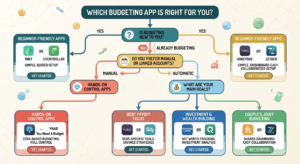
    How to Choose the Right Budgeting App for You

    With so many excellent options, how do you decide? Ask yourself these questions:

    Question 1: What’s Your Budgeting Experience Level?

    Beginner: Start with Mint (free, simple) or PocketGuard (extremely simple)

    Intermediate: Try EveryDollar, Simplifi, or Monarch Money

    Advanced: YNAB offers the most comprehensive methodology

    Question 2: What’s Your Budget for Budgeting?

    $0: Mint, Personal Capital, Honeydue, or Zeta

    Under $100/year: EveryDollar ($79.99), Goodbudget ($70), or Copilot ($79.99)

    $100+/year: YNAB ($109), Monarch Money ($99.99), or Simplifi ($47.88)

    Question 3: How Much Time Will You Invest?

    Minimal (5 minutes/week): Mint, Personal Capital, or PocketGuard

    Moderate (15-30 minutes/week): EveryDollar, Simplifi, or Monarch

    Committed (30+ minutes/week): YNAB or Goodbudget

    Question 4: What’s Your Primary Goal?

    Stop overspending: YNAB, EveryDollar, or PocketGuard

    Track where money goes: Mint or Simplifi

    Pay off debt: YNAB, EveryDollar, or PocketGuard

    Build wealth/invest: Personal Capital or Empower

    Budget with partner: Honeydue, Zeta, or Monarch Money

    Question 5: Do You Prefer Automatic or Manual Tracking?

    Automatic (bank syncing): Mint, YNAB Premium, EveryDollar Premium, Simplifi

    Manual entry: Goodbudget, EveryDollar Free, YNAB (can be used manually)

    Hybrid: Most apps support both methods


    Key Features to Look For in Any Budgeting App

    Regardless of which app you choose, ensure it includes these essential features:

    1. Bank-Level Security

    Look for:

    • 256-bit encryption
    • Two-factor authentication
    • Read-only bank access (can’t move money)
    • SOC 2 certification
    • Regular security audits

    Red Flag: Any app that asks for your actual bank login credentials instead of using secure API connections.

    2. Multi-Device Access

    Your budgeting app should work seamlessly across:

    • Smartphone (iOS and Android)
    • Tablet
    • Desktop web browser
    • Automatic syncing between devices

    3. Customizable Categories

    Every household is unique. Good apps let you:

    • Create custom spending categories
    • Split transactions across multiple categories
    • Rename existing categories
    • Set individual limits for each category

    4. Goal Tracking

    Whether saving for emergency fund, vacation, or retirement, your app should:

    • Track multiple goals simultaneously
    • Show progress visually
    • Calculate how long until goal completion
    • Allow goal-specific savings accounts

    5. Alerts and Notifications

    Stay on track with:

    • Low balance warnings
    • Bill payment reminders
    • Overspending alerts
    • Unusual transaction notifications
    • Weekly spending summaries

    6. Reporting Capabilities

    Understand your financial patterns through:

    • Monthly spending reports
    • Category trend analysis
    • Year-over-year comparisons
    • Net worth tracking
    • Customizable date ranges

    Common Budgeting App Mistakes to Avoid

    Even with the best app, these mistakes can derail your budgeting efforts:

    Mistake 1: Choosing the Wrong App for Your Style

    The Problem: Downloading YNAB when you want passive tracking, or using Mint when you need strict accountability.

    The Solution: Honestly assess your budgeting style and commitment level before choosing. If you’ve failed at budgeting before, start simple (Mint or PocketGuard) rather than jumping to advanced apps.

    Mistake 2: Not Checking the App Regularly

    The Problem: Installing an app then ignoring it for weeks. Automatic syncing doesn’t mean automatic financial improvement.

    The Solution: Set a specific time for weekly budget reviews. Sunday evening or Friday morning works well for most people. Block 15 minutes on your calendar.

    Mistake 3: Setting Unrealistic Budget Categories

    The Problem: Allocating $100/month for groceries when you’ve been spending $400, then giving up when you inevitably exceed the limit.

    The Solution: Start with your actual spending (track for one month without restrictions), then make gradual reductions. Cut 10% first, stabilize, then cut more if desired.

    Mistake 4: Not Accounting for Irregular Expenses

    The Problem: Forgetting about annual expenses like car registration, insurance, holiday gifts, or summer camps until they hit.

    The Solution: List all irregular expenses for the year, divide by 12, and budget that amount monthly. YNAB calls this “embracing your true expenses.”

    Mistake 5: Switching Apps Too Frequently

    The Problem: Jumping to a new app every time you encounter a minor frustration, never giving any system time to work.

    The Solution: Commit to one app for at least 90 days. Most budgeting success comes from consistency, not the perfect tool.

    Mistake 6: Ignoring Your Partner

    The Problem: Budgeting solo when you share finances, leading to conflict and sabotaged budgets.

    The Solution: Choose an app with multi-user access (YNAB, Monarch, Honeydue, Zeta) and have weekly budget meetings with your partner. Our best bank accounts guide includes tips for couples banking together.


    How to Set Up Your Budgeting App for Success

    Follow this step-by-step process regardless of which app you choose:

    Week 1: Setup and Baseline

    Day 1-2: Connect Accounts

    • Link all bank accounts
    • Connect credit cards
    • Add investment accounts (if app supports)
    • Include loan accounts

    Day 3-4: Clean Up Transactions

    • Review automatically categorized transactions
    • Fix any miscategorizations
    • Split transactions if needed
    • Delete any duplicate imports

    Day 5-7: Observe Spending

    • Don’t change behavior yet
    • Just watch where money goes
    • Take notes on surprise spending
    • Identify forgotten subscriptions

    Week 2: Create Your Budget

    Review Past Spending

    • Look at last 3 months in app
    • Calculate average spending per category
    • Identify highest expense categories
    • Note seasonal variations

    Set Initial Categories

    • Start with app’s default categories
    • Add custom categories as needed
    • Keep it simple (15-20 categories max)
    • Create broader categories, not narrow ones

    Allocate Your Income

    • Enter expected monthly income
    • Assign to fixed expenses first (rent, insurance, loan payments)
    • Allocate to variables (groceries, gas)
    • Assign to savings goals
    • Put remaining in discretionary categories

    Week 3: Test and Adjust

    Monitor Daily

    • Check app each evening
    • Verify transactions categorized correctly
    • Stay aware of category balances
    • Adjust as needed

    Weekly Review

    • Set aside 15 minutes every Sunday
    • Review each category’s status
    • Adjust allocations if needed
    • Plan for upcoming week’s expenses

    Make Small Changes

    • Adjust one or two categories
    • Test new limits
    • See what feels sustainable
    • Don’t try to change everything at once

    Week 4: Establish Routine

    Create Habits

    • Set specific review times
    • Enable all relevant alerts
    • Check before making purchases
    • Log cash transactions immediately

    Evaluate Progress

    • Compare planned vs actual spending
    • Celebrate wins (even small ones)
    • Identify problem categories
    • Adjust approach for month two

    Maximizing Your Budgeting App’s Potential

    Once you’ve mastered the basics, use these advanced strategies:

    Strategy 1: Use Multiple Apps Together

    Many successful budgeters use app combinations:

    YNAB + Personal Capital: Detailed budgeting + investment tracking
    Mint + YNAB: Free overview + serious budgeting when ready
    EveryDollar + Honeydue: Personal budget + couple communication

    Strategy 2: Automate Everything Possible

    Set up automatic transfers for:

    • Savings goals (to separate high-yield accounts)
    • Debt payments (more than minimum)
    • Investment contributions
    • Bill payments

    Learn how to maximize your savings with our high-yield savings accounts guide.

    Strategy 3: Create Sinking Funds

    For irregular expenses, create dedicated savings categories:

    • Holiday gifts
    • Car maintenance
    • Insurance premiums
    • Vacation fund
    • Medical expenses
    • Home repairs

    Strategy 4: Review and Reflect Monthly

    End of each month, spend 30 minutes:

    • Comparing budget vs actual
    • Identifying spending triggers
    • Celebrating successes
    • Adjusting next month’s budget
    • Checking progress toward annual goals

    Strategy 5: Use Reports for Insights

    Most apps generate valuable reports:

    • Spending trends over time
    • Category comparisons month-to-month
    • Net worth growth trajectory
    • Income vs expenses visualization

    Review these quarterly to spot patterns you’d otherwise miss.


    Privacy and Security Considerations

    Budgeting apps require access to sensitive financial data. Protect yourself:

    What to Look For

    ✅ Read-Only Access: App can view transactions but can’t move money
    ✅ 256-Bit Encryption: Same security banks use
    ✅ Two-Factor Authentication: Extra login security layer
    ✅ Regular Security Audits: Third-party verification
    ✅ Clear Privacy Policy: Transparent about data usage
    ✅ No Data Selling: Verify app doesn’t sell your information

    Red Flags

    ❌ Apps asking for PIN numbers or security questions
    ❌ No encryption mentioned in documentation
    ❌ Vague privacy policies
    ❌ No customer support contact information
    ❌ Excessive permissions requests
    ❌ No two-factor authentication option

    Best Practices

    1. Use Strong, Unique Passwords: Never reuse passwords across financial apps
    2. Enable Biometric Login: Use fingerprint or face recognition when available
    3. Update Regularly: Install app updates promptly for security patches
    4. Review Connected Accounts: Quarterly check which accounts are linked
    5. Monitor for Unauthorized Access: Watch for login alerts from unknown devices


    Budgeting Apps for Special Situations

    For Freelancers and Variable Income

    Best Options: YNAB, Simplifi, or EveryDollar

    Key Features Needed:

    • Ability to budget with uneven income
    • Prioritization of expenses
    • Buffer building capabilities
    • Multiple income source tracking

    Strategy: Budget one month ahead using previous month’s income. Build a buffer before budgeting future income.

    For Families with Children

    Best Options: YNAB (family sharing), Monarch Money, or EveryDollar

    Key Features Needed:

    • Multiple user access
    • Allowance tracking
    • Activity/childcare category management
    • Goal tracking for college savings

    Strategy: Create specific categories for each child’s activities and needs. Use goal tracking for college funds.

    For Debt Payoff Focus

    Best Options: YNAB, EveryDollar, or PocketGuard

    Key Features Needed:

    • Debt tracking with interest rates
    • Payoff timeline projections
    • Snowball or avalanche calculators
    • Aggressive budgeting methodology

    Strategy: Use zero-based budgeting to find extra dollars for debt payments. Track multiple debts and celebrate milestones.

    For Retirement Planning

    Best Options: Personal Capital, Empower, or Simplifi

    Key Features Needed:

    • Retirement calculator
    • Investment tracking
    • Net worth monitoring
    • Fee analysis

    Strategy: Track net worth monthly, review investment fees quarterly, adjust retirement contributions based on calculator projections.


    Frequently Asked Questions About Budgeting Apps

    Are budgeting apps safe?

    Yes, when you choose reputable apps with proper security. Look for 256-bit encryption, two-factor authentication, and read-only bank access. Major apps like YNAB, Mint, and Personal Capital use the same security protocols as banks. They cannot move your money—only view transactions.

    Do budgeting apps really help you save money?

    Studies show yes—significantly. Users of budgeting apps save an average of $600 more annually than non-users. YNAB specifically reports users save $600 in the first two months and pay off $6,000 in debt the first year. The key is consistent use, not just downloading the app.

    What’s the best free budgeting app?

    Mint is the best overall free option, offering comprehensive features without cost. For couples, Honeydue or Zeta are excellent free choices. For envelope budgeting, Goodbudget’s free version (20 envelopes) works well for most households.

    Is YNAB worth the cost?

    For people serious about budgeting, yes. At $109/year, it pays for itself if it helps you save $10/month or avoid a single overdraft fee. Users consistently report saving significantly more than the subscription cost. However, free alternatives like Mint or EveryDollar’s basic version work fine for casual budgeters.

    Can I use a budgeting app if I hate budgeting?

    Absolutely. Apps like PocketGuard or Mint require minimal effort—just connect accounts and check occasionally. You don’t need to actively manage categories or allocate every dollar. Even passive monitoring helps you spend less by increasing awareness.

    Should I use the same app as my partner?

    Not necessarily. Some couples each use individual apps plus a shared app like Honeydue or Zeta for joint expenses. Others use one comprehensive app with multi-user access (YNAB, Monarch). What matters is that you both engage with the system and communicate about money.

    Do I need to link my bank account or can I enter transactions manually?

    Most apps work both ways. Automatic linking is easier and more accurate, but manual entry works if you’re privacy-conscious or your bank isn’t supported. Goodbudget and EveryDollar’s free version are designed for manual entry.

    What if my bank isn’t supported by the app?

    Check the app’s supported institutions list before subscribing. Major apps support 10,000-16,000 banks, covering 95%+ of US institutions. If your bank isn’t supported, you can manually add transactions or choose a different app. Consider switching to a better bank—check our best bank accounts for 2025 guide.

    Can budgeting apps help me get out of debt faster?

    Yes. Apps with debt tracking features (YNAB, EveryDollar, PocketGuard) help you stay accountable, find extra money for payments, and visualize progress. The debt snowball or avalanche calculators show exactly when you’ll be debt-free, providing motivation to stick with the plan.

    How long does it take to see results from using a budgeting app?

    Most people notice increased awareness immediately and behavioral changes within 2-4 weeks. Measurable financial improvements (reduced spending, increased savings) typically appear within 60-90 days. Give any app a full three months before deciding if it’s working.


    Take Action: Your 30-Day Budgeting App Challenge

    Ready to transform your finances? Follow this 30-day plan:

    Days 1-3: Choose Your App

    •  Review the apps in this guide
    •  Determine your budget and priorities
    •  Select 2-3 apps to trial
    •  Sign up for free trials
    •  Download to phone and computer

    Days 4-7: Setup and Connect

    •  Link all bank accounts
    •  Connect credit cards
    •  Add loan/debt accounts
    •  Set up investment tracking (if applicable)
    •  Verify all transactions importing correctly

    Days 8-14: Observe and Learn

    •  Review transactions daily
    •  Fix categorization errors
    •  Track but don’t change spending
    •  Learn app features and interface
    •  Watch tutorial videos

    Days 15-21: Create Your Budget

    •  Calculate average spending per category
    •  Set realistic category limits
    •  Allocate all income
    •  Establish savings goals
    •  Set up alerts and notifications

    Days 22-28: Live Your Budget

    •  Check app before purchases
    •  Adjust categories as needed
    •  Use app to make spending decisions
    •  Log cash transactions
    •  Have partner review together (if applicable)

    Days 29-30: Evaluate and Commit

    •  Review entire month’s results
    •  Calculate money saved
    •  Identify successes and challenges
    •  Decide if continuing with this app
    •  Subscribe or try different option
    •  Plan improvements for month two

    Conclusion: Your Perfect Budgeting App Is Out There

    There’s no single “best” budgeting app—only the best app for YOUR specific situation, goals, and personality.

    If you’re just starting out and want something free and simple, Mint is your answer. If you’re serious about transforming your finances and willing to invest time and money, YNAB delivers unmatched results. Couples should explore Honeydue, Zeta, or Monarch Money. Apple enthusiasts will love Copilot. Investors need Personal Capital.

    The most important decision isn’t which app you choose—it’s that you choose one and commit to using it.

    Remember these key principles:

    ✅ Consistency beats perfection: Using an imperfect app regularly beats having the “perfect” app you never open
    ✅ Start simple, add complexity: Begin with basic tracking, graduate to detailed budgeting as you’re ready
    ✅ Give it 90 days: Real results require at least three months of consistent use
    ✅ Adjust your approach: If one app isn’t working after fair trial, switch without guilt
    ✅ Use it daily: Make checking your budget a 5-minute morning routine

    The average American could save $500-1,000 annually just by tracking expenses and making conscious spending decisions. That’s the power of budgeting apps—not in fancy features or complex algorithms, but in the simple act of paying attention to where your money goes.

    Download an app today. Connect your accounts. Spend 15 minutes exploring. Take that first small step toward financial control.

    Your future self—with a robust emergency fund, zero credit card debt, and peace of mind—will thank you.

    Ready to optimize your complete financial picture? Explore these related guides:

  • How to Save Money Fast: 50+ Proven Ways to Cut Expenses

    How to Save Money Fast: 50+ Proven Ways to Cut Expenses

    📋 Table of Contents

    1. Why Most People Struggle to Save Money
    2. Set a Clear Savings Goal First
    3. Save Money on Housing
    4. Save Money on Food & Groceries
    5. Save Money on Transportation
    6. Cut Your Monthly Bills & Subscriptions
    7. Save Money on Shopping & Clothing
    8. Save Money on Entertainment
    9. Save Money on Health & Wellness
    10. Smart Habits That Supercharge Your Savings
    11. Quick Wins — Save Money This Week
    12. Frequently Asked Questions
    13. Final Thoughts


    Why Most People Struggle to Save Money {#why-struggle}

    Let’s be honest for a second.

    Most people know they should be saving money. They’ve heard the advice a hundred times. But when Friday comes around and the paycheck lands — somehow it disappears before Sunday.

    Sound familiar?

    You’re not alone. According to a recent survey, nearly 57% of Americans can’t cover a $1,000 emergency expense from savings alone. The problem isn’t always income. Often, it’s the lack of a clear system and not knowing where the money is actually going.

    The good news? Saving money doesn’t require a massive salary, extreme sacrifice, or a finance degree. It requires awareness, a simple plan, and the right strategies — all of which you’ll find in this guide.

    Whether you want to save $500 this month or $10,000 this year, these 50+ tips are your starting point.

    💡 Before you dive in: Make sure you’ve read our Complete Guide to Budgeting: Build Wealth on Any Income — it pairs perfectly with this article and helps you put every dollar you save to work.


    Step 1 — Set a Clear Savings Goal First {#set-goal}

    Before you cut a single expense, you need to know what you’re saving for. Vague goals produce vague results. “I want to save more money” is not a plan. A plan sounds like this:

    “I want to save $3,000 in 6 months for an emergency fund by cutting $500/month from my budget.”

    How to Set a SMART Savings Goal

    Use the SMART framework:

    • Specific — Exactly how much do you want to save?
    • Measurable — How will you track it?
    • Achievable — Is it realistic given your income?
    • Relevant — Why does this goal matter to you?
    • Time-bound — What’s your deadline?

    Examples of SMART Savings Goals:

    Goal Amount Timeline Monthly Savings Needed
    Emergency Fund $2,000 4 months $500/month
    Vacation Fund $1,500 6 months $250/month
    Down Payment $20,000 2 years $833/month
    Debt Payoff $5,000 10 months $500/month

    🔗 Related: Emergency Fund Guide: How Much to Save and Where to Keep It — Learn exactly how to build your financial safety net.


    Save Money on Housing {#housing}

    Housing is the single biggest expense for most households — typically 25–35% of take-home pay. Even small changes here can free up hundreds of dollars every month.

    1. Negotiate Your Rent

    Many renters don’t realize rent is negotiable — especially if you’re a reliable, long-term tenant. Call your landlord before your lease renews and ask for a rate freeze or a small reduction. The worst they can say is no.

    2. Get a Roommate

    Splitting rent with even one roommate can cut your housing costs by 30–50%. On a $1,500/month rent, that’s $750 back in your pocket every single month — $9,000 per year.

    3. Downsize Your Living Space

    If you’re in a 3-bedroom apartment alone, do you really need all that space? Downsizing to a smaller unit can save $200–$600 per month depending on your market.

    4. House Hack

    If you own a home, consider renting out a spare room on Airbnb or to a long-term tenant. This strategy — called house hacking — can offset your entire mortgage payment.

    5. Refinance Your Mortgage

    If you’re a homeowner with a high interest rate, refinancing when rates drop can save you tens of thousands of dollars over the life of your loan. Even a 1% rate reduction on a $250,000 mortgage saves over $150 per month.

    6. Move to a Lower Cost-of-Living Area

    If remote work is an option for you, consider relocating to a city or state where the cost of living is significantly lower. Your savings rate could double without changing your income at all.


    Save Money on Food & Groceries {#food}

    Food is the second most flexible expense in most budgets — and one of the easiest places to find savings without feeling deprived.

    7. Meal Plan Every Week

    Planning your meals before grocery shopping is one of the most effective money-saving habits you can build. People who meal plan spend an average of $40–$60 less per week on groceries than those who don’t.

    Simple Meal Planning System:

    • Sunday: Plan 5–7 dinners for the week
    • Write your grocery list based ONLY on what you need
    • Never shop hungry (impulse purchases skyrocket)

    8. Buy Generic/Store Brand Products

    Store-brand products are manufactured by the same factories as name brands — they just cost 20–40% less. Switch to store brands for staples like rice, pasta, canned goods, cleaning products, and over-the-counter medications.

    9. Use Cashback & Coupon Apps

    Apps like Ibotta, Rakuten, Fetch Rewards, and Honey automatically apply coupons and give you cashback on groceries and online shopping. Some users report saving $50–$150 per month just using these apps consistently.

    10. Cook at Home More Often

    The average restaurant meal costs 5–10x more than cooking the same dish at home. If you eat out just 3 times per week at an average of $18 per meal, that’s $216/month — over $2,500/year. Cooking at home even 4 of those meals saves you around $130/month.

    11. Embrace Batch Cooking and Freezing

    Cook large quantities on weekends and freeze individual portions. This eliminates “I have nothing to eat” moments that lead to expensive takeout orders.

    12. Reduce Food Waste

    The average American household throws away $1,500 worth of food per year. Use the “first in, first out” system in your fridge, freeze items before they expire, and plan meals around what’s already in your pantry.

    13. Buy Meat in Bulk and Freeze It

    Buying family-sized packs of chicken, ground beef, or fish is almost always cheaper per pound than buying small portions. Divide and freeze immediately.

    14. Shop at Discount Grocery Stores

    Stores like Aldi, Lidl, Trader Joe’s, and local ethnic grocery markets often offer the same quality products at 20–40% lower prices than traditional supermarkets.

    15. Cancel Meal Kit Subscriptions

    Meal kit services like HelloFresh or Blue Apron cost $10–$15 per serving — far more than cooking from scratch. Cancel and use their free recipe cards online instead.

    16. Grow Your Own Herbs

    A small windowsill herb garden (basil, cilantro, mint, parsley) costs about $5 upfront and saves $3–$5 per bunch every time you’d otherwise buy fresh herbs at the store.


    Save Money on Transportation {#transport}

    After housing and food, transportation is typically the third-largest household expense. Here’s where to find savings:

    17. Refinance Your Car Loan

    If you took out a car loan at a high interest rate, refinancing could save you $50–$150 per month. Check rates at your credit union before calling your current lender.

    18. Shop Around for Car Insurance Every Year

    Loyalty rarely pays in car insurance. Rates vary wildly between companies. Use comparison tools to shop your rate every year at renewal time. Most people save $200–$600 per year just by switching.

    19. Carpool or Use Public Transportation

    Carpooling with one coworker cuts your commuting fuel costs in half. Public transit passes typically cost a fraction of what you’d pay in gas, parking, and vehicle wear-and-tear combined.

    20. Maintain Your Vehicle Properly

    Regular oil changes, tire rotations, and keeping tires properly inflated improve fuel efficiency and prevent expensive repairs down the road. A $50 oil change can prevent a $2,000 engine problem.

    21. Drive Less Aggressively

    Aggressive driving — rapid acceleration, hard braking, speeding — reduces fuel efficiency by up to 30%. Calmer driving habits directly translate to fewer trips to the gas station.

    22. Sell Your Second Car

    If your household has two cars and one rarely gets used, consider selling it. Eliminating a second car removes insurance costs, registration fees, maintenance, and gas — potentially saving $3,000–$6,000 per year.

    23. Work From Home When Possible

    Even working from home 2–3 days per week significantly reduces fuel, parking, and vehicle maintenance costs over the course of a year.


    Cut Your Monthly Bills & Subscriptions {#bills}

    This category is a goldmine for savings — especially in the age of subscription services.

    24. Audit Every Single Subscription You Pay For

    Pull up your bank and credit card statements and highlight every recurring charge. Most people find 2–5 subscriptions they forgot about or barely use. Cancel them immediately.

    Common forgotten subscriptions:

    • Streaming services (Netflix, Hulu, HBO Max, Disney+, Spotify, Apple Music)
    • Gym memberships
    • App subscriptions
    • Cloud storage plans
    • Magazine or news site subscriptions
    • Software tools

    25. Rotate Streaming Services

    You don’t need all streaming services simultaneously. Subscribe to one for 2–3 months, binge what you want, then cancel and switch to another. This alone can save $30–$60 per month.

    26. Call Your Internet Provider and Negotiate

    Internet companies routinely charge loyal customers more than new customers. Call and say you’re considering switching. They’ll often match competitor rates or offer discounts — saving $20–$40 per month without changing providers.

    27. Switch to a Budget Phone Plan

    Major carriers like Verizon and AT&T charge $60–$100+ per line. Budget carriers like Mint Mobile, Visible, and Cricket Wireless use the same towers for $15–$35 per month. Same coverage, fraction of the price.

    28. Lower Your Electricity Bill

    • Switch to LED bulbs (use 75% less energy)
    • Unplug electronics when not in use (“vampire energy” costs the average household $100–$200 per year)
    • Wash clothes in cold water
    • Use a programmable thermostat (Nest or Ecobee can save 10–15% on heating/cooling)
    • Air dry dishes instead of using the heated drying cycle

    29. Bundle Home Services

    Many providers offer discounts for bundling internet, cable, and home phone together. However, always compare bundles vs. individual services from competing providers before assuming the bundle is the best deal.

    30. Lower Your Water Bill

    • Fix leaky faucets immediately (a dripping faucet wastes ~3,000 gallons per year)
    • Take shorter showers
    • Install low-flow showerheads and faucet aerators
    • Only run dishwashers and washing machines with full loads

    Save Money on Shopping & Clothing {#shopping}

    31. Implement the 24-Hour Rule for Non-Essential Purchases

    Before buying anything that isn’t a necessity, wait 24 hours. Most impulse purchases are forgotten by the next day. This single habit can save hundreds of dollars per month.

    32. Shop Secondhand First

    ThredUp, Poshmark, Facebook Marketplace, eBay, and local thrift stores offer brand-name clothing and household items at 50–90% off retail. Many items are brand new with tags still on.

    33. Never Buy at Full Retail Price

    Almost everything goes on sale eventually. Use tools like CamelCamelCamel (tracks Amazon price history) or Honey (auto-applies coupon codes) to make sure you never overpay.

    34. Unsubscribe From Retail Email Lists

    Every promotional email is designed to trigger a purchase. Unsubscribe from stores you shop at impulsively. “Out of sight, out of mind” genuinely works for spending.

    35. Build a Capsule Wardrobe

    Instead of chasing trends, invest in 20–30 high-quality, versatile pieces that work together. This eliminates the “I have nothing to wear” cycle that drives unnecessary clothing purchases.

    36. Use Buy Nothing Groups

    Facebook “Buy Nothing” community groups are local groups where neighbors give away items they no longer need — completely free. You can furnish an entire apartment through these groups.


    Save Money on Entertainment {#entertainment}

    37. Use Your Library Card (It’s Free)

    Your local library gives you free access to:

    • Physical books, DVDs, and audiobooks
    • Libby app — free e-books and audiobooks
    • Kanopy — free movie streaming
    • Magazines, newspapers, and research databases
    • Free community events and classes

    38. Find Free Local Events

    Most cities offer free concerts, outdoor movies, festivals, museum days, and park events year-round. Check local Facebook groups, Eventbrite (filter by “free”), and your city’s official events calendar.

    39. Host a Potluck Instead of Going Out

    Instead of a $50-per-person dinner at a restaurant, organize a potluck with friends. You get the social connection for a fraction of the cost and often have more fun.

    40. Cancel the Gym and Work Out at Home

    YouTube channels like FitnessBlender, Yoga with Adriene, and Juice & Toya offer free, professional workout videos. A $30 set of resistance bands and a yoga mat can replace a $50/month gym membership.


    Save Money on Health & Wellness {#health}

    41. Use GoodRx for Prescription Medications

    GoodRx compares prescription drug prices at pharmacies near you. Many people save 60–80% on medications — sometimes more than with their own insurance co-pay.

    42. Use Telehealth Services

    For non-emergency medical consultations, telehealth apps like Teladoc or MDLive cost $0–$75 per visit — far less than an in-person urgent care visit.

    43. Review Your Health Insurance Plan Annually

    During open enrollment, compare your current plan against alternatives. Most people auto-renew without comparing — and overpay by hundreds of dollars per year.

    44. Prioritize Preventive Care

    Annual check-ups, dental cleanings, and routine screenings are typically free or low-cost with insurance — and catching problems early saves thousands in future medical bills.


    Smart Habits That Supercharge Your Savings {#habits}

    45. Automate Your Savings

    Set up an automatic transfer from your checking account to your savings account on payday. Even $50 or $100 per paycheck adds up to $1,200–$2,600 per year without any willpower required. Pay yourself first before you can spend the money.

    46. Use the 1% Challenge

    Increase your savings rate by just 1% every month. If you save 5% of your income today, save 6% next month, 7% the month after. Most people don’t even notice the difference in their lifestyle, but the compound effect over years is dramatic.

    47. Do a No-Spend Week Every Month

    Pick one week per month where you spend money on nothing except true necessities (rent, utilities, food from what’s already at home). Most people save $100–$300 during a no-spend week.

    48. Track Every Dollar You Spend

    You cannot improve what you don’t measure. Use a free budgeting app, a spreadsheet, or even a simple notebook. The act of tracking spending alone reduces it by 15–20% for most people.

    🔗 Related: Want to track every dollar perfectly? Read our Zero-Based Budgeting Explained: Take Control of Every Dollar guide to learn the most powerful budgeting method for savers.

    49. Create a “Fun Money” Budget

    Complete deprivation leads to binging. Give yourself guilt-free spending money — $50 to $100 per month — that you can spend on anything, no questions asked. This makes your budget sustainable long-term.

    50. Avoid Lifestyle Inflation

    Every time you get a raise, the temptation is to upgrade your lifestyle immediately. Instead, direct at least 50% of every raise directly into savings or investments before adjusting your spending habits.


    Quick Wins — Save Money Starting This Week {#quick-wins}

    These are things you can do right now that will put money back in your pocket within days:

    # Action Estimated Savings
    51 Cancel 2–3 unused subscriptions $20–$60/month
    52 Switch to a budget phone plan $30–$70/month
    53 Install GoodRx and check your prescriptions Up to 80% on meds
    54 Call your internet provider and negotiate $20–$40/month
    55 Meal plan and grocery shop with a list $40–$80/month
    56 Turn off lights and unplug electronics $10–$20/month
    57 Sell 5 items you don’t use on Facebook Marketplace $50–$200 one-time
    58 Move savings to a high-yield account Earn 4–5% APY
    59 Set up $100 automatic savings transfer $1,200/year
    60 Download Ibotta and Fetch Rewards $20–$60/month

    🔗 Pro Tip: Once you start saving, make sure you’re keeping that money in the right place. Read our Emergency Fund Guide: How Much to Save and Where to Keep It to learn the best accounts for your savings.


    How Much Can You Actually Save?

    Let’s put it all together with a realistic example:

    📊 Sample Monthly Savings Potential

    Category Monthly Savings
    Food & Groceries (meal plan + cook at home) $150
    Subscriptions (cancel unused, rotate streaming) $45
    Phone plan (switch to budget carrier) $50
    Internet (negotiate) $30
    Electricity (LED + habit changes) $25
    Shopping (24-hour rule + secondhand) $75
    Entertainment (library + free events) $40
    Gym (cancel + home workouts) $50
    Total Monthly Savings $465/month
    Annual Savings $5,580/year

    That’s over $5,500 per year without changing your income by a single dollar. Put that into an investment account earning 7% annually, and in 10 years you’d have over $76,000.


    Frequently Asked Questions {#faqs}

    ❓ How much money should I try to save each month?

    Financial experts recommend saving at least 20% of your take-home pay (based on the 50/30/20 rule). However, if you’re starting from zero, even saving $50 to $100 per month is a great beginning. The key is consistency — not the amount.

    ❓ What’s the fastest way to save money?

    The fastest ways to save money are: (1) audit and cancel unused subscriptions, (2) switch to a budget phone carrier, (3) negotiate your rent or cable/internet bills, and (4) meal plan and cook at home. These four steps alone can free up $200–$400 per month within days.

    ❓ How can I save money when I’m living paycheck to paycheck?

    Start small and automate. Even setting aside $25 per paycheck into a separate savings account is a meaningful step. Then focus on cutting your biggest expenses first — housing, food, and transportation. As your savings buffer grows, the paycheck-to-paycheck cycle naturally breaks.

    ❓ Should I save money or pay off debt first?

    This depends on the interest rate of your debt. A common approach: first save a small emergency fund ($500–$1,000), then aggressively pay off high-interest debt (credit cards), then return to building your full emergency fund. Check out our guide on Zero-Based Budgeting for a full strategy.

    ❓ Where should I keep money I’m saving?

    For short-term savings goals and emergency funds, keep money in a High-Yield Savings Account (HYSA) — these currently pay 4–5% APY compared to 0.01% at most traditional banks. For long-term goals (retirement, wealth building), invest in index funds. Read our Emergency Fund Guide for account recommendations.

    ❓ Is it worth saving small amounts like $5 or $10 at a time?

    Absolutely. Small, consistent savings habits build the discipline and systems that eventually allow you to save larger amounts. The habit matters more than the amount at the beginning.

    ❓ What is the 30-day savings rule?

    The 30-day rule means waiting 30 days before making any non-essential purchase. If you still want it after 30 days, you can buy it guilt-free. Most impulse buys are forgotten long before the 30 days are up, saving you significant money.


    Final Thoughts {#conclusion}

    Saving money doesn’t have to be about suffering, sacrifice, or giving up everything you enjoy. It’s about being intentional with where your money goes so that you have more control over your future.

    Here’s what to do right now:

    Your 3-Step Action Plan:

    1. ✅ This week — Audit your subscriptions, cancel 2–3 unused ones, and call your internet or phone provider to negotiate a lower rate
    2. ✅ This month — Implement meal planning, set up a $100 automatic savings transfer, and download Ibotta or Rakuten
    3. ✅ This quarter — Apply the 50/30/20 budget rule, open a high-yield savings account, and work toward your first $1,000 emergency fund

    Remember: Every dollar you save today is a dollar working for your future. Start with one or two tips from this list. Then add more as those become habits. Over time, the cumulative effect will transform your financial life.